TR-01
Purpose and Technical Philosophy
Technical review exists to keep EFVD cars fair, stable, broadcast-ready and consistent for judged tandem competition.
Same rule set
Cars must use the official season data and approved technical requirements.
Server-safe files
Cars should load cleanly, avoid oversized assets and not create event delays.
Broadcast quality
Cars should look professional and be identifiable on stream, replay and screenshots.
TR-02
Vehicle Eligibility
Cars must fit the EFVD competition category before visual, file or physics review continues.
| Rule | Requirement |
|---|---|
| Eligible body styles | Coupe, sedan, convertible, hatchback, estate/wagon or passenger-car-based unibody ute, with no more than 5 doors. |
| Vehicle platform | Post-1985 vehicle with a RWD drivetrain. The underlying 3D model must retain factory stock unibody/chassis dimensions. |
| Minimum factory weight | The base production car must have a manufacturer-published curb weight of at least 900 kg in at least one production trim or market version. This is an eligibility rule, not a physics setting; in-game mass still follows your Physics Suite chassis (TR-07). Staff may ask for a source. |
| Car identity | The car must visually match the submitted model. No misleading shell swaps: the body you see must be the car you entered. |
| Race-car bases | No GT3-class or higher-spec purpose-built race car may be used as the base model. |
| Not allowed | No SUV, truck, body-on-frame pickup, monster truck, plane, boat, animal or joke vehicle. |
| Wheel style | No donkey-style wheels. Wheel size must look realistic for the car. |
TR-03
Visual Standards and Livery Rules
The car must look like it belongs in a serious drift competition and be suitable for public broadcast.
| Area | Requirement |
|---|---|
| Body kit and livery | Professional-looking body kit and finish required. Plain-colour paint is allowed; a livery is optional. Required EFVD decals still apply. |
| Wheel fitment | Wheels must be realistic in size. Wheel clearance is assessed during normal steering and suspension movement, not only with the car stationary and wheels straight. Significant clipping through fenders or arches may require correction. |
| Wheel stickers | Contrasting color sticker required on wheels. |
| Lighting style | No automatic strobe lights or neon. |
| Stream-safe content | Offensive, explicit, hateful or unreadable liveries can be rejected. |
TR-04
Brake Lights and EFVD Identification
Every car needs working rear brake lights. EFVD fits its own signal lights, roof light bar, windshield banner and door plates on every car during car preparation, so submit your car without them and keep their areas clear.
| Item | Requirement |
|---|---|
| Rear brake lights | Working rear brake lights are required. Set them up in data/lights.ini ([BRAKE_n] entries) on the car's real tail-light meshes so they light up when you brake. CSP extension config may enhance them but does not replace lights.ini. |
| EFVD-added assets | Submit without any EFVD light, windshield banner or door plates. EFVD fits them on every car during car preparation, before approval. Do not add your own copies. |
| Keep the banner area clear | Keep the top of the windshield free of livery text, logos and stickers so the EFVD banner fits. |
| Keep the light areas clear | Nothing on the roof edge directly above the windshield (EFVD roof light bar, about 91 cm, centred) or along the side edges of the windshield next to the A-pillars (EFVD signal lights): no light bar, LED strip, aerial, sticker or other part. Anything in these areas may be removed or covered. |
| Keep the door plate area clear | Keep the upper front part of each front door, just below the window, free of large decals and parts so the EFVD door plate fits. Livery paint is fine; the plate goes on top. |
| Sponsor and event branding | EFVD staff add required sponsor and event branding where applicable. |
| Official preparation kit | The public EFVD Car Tech Kit contains the current physics and the driver/inspector checklist. |
TR-05
Optimization and File Size Limits
Cars must meet one of the approved optimization profiles. Pick one profile and keep the car within all limits in that profile.
| Profile | Limits |
|---|---|
| Profile A | Up to 575,000 triangles, 300 objects, 175 materials. |
| Profile B | Up to 675,000 triangles, 250 objects, 150 materials. |
| Profile C | Up to 800,000 triangles, 200 objects, 125 materials. |
| KN5 / FBX size | KN5 max 80MB. FBX should be similar in size. The banner, door plates and signal lights EFVD fits during car preparation do not count toward these limits. |
| Skin folder | Skin folder max size 50MB. |
TR-06
Texture and Material Rules
Texture rules keep car packages clean, efficient and easier to review.
| Rule | Requirement |
|---|---|
| Texture format* | All material textures must be .dds. Non-DDS material textures are not allowed. |
| Unused files | Remove unused textures, backups and duplicate assets before submission. |
| Material count | Material count must stay within the chosen optimization profile. |
* Exceptions: Standard Assetto Corsa interface and generated assets are exempt: images in ui/, root body and tyre shadows, skin preview/livery thumbnails, CSP extension images, and flame images. PNG/JPG dashboard textures are also allowed when explicitly referenced by data/digital_instruments.ini as TEXTURE_BASE or TEXTURE_TOP. Unused similarly named copies must still be removed.
TR-07
Physics and Performance Rules
Physics and performance must match the official season package. Drivers may not create a performance advantage through unapproved data.
| Area | Requirement |
|---|---|
| Official data | Use official season Engine, Gearbox, Tires, Aero and Suspension data. |
| Chassis | All chassis physics, including weight, centre of gravity, brakes and suspension values, must match the selected Physics Suite configuration, except for explicitly permitted vehicle-specific dimensions: wheelbase, track width, fuel tank position and inertia may follow realistic real-car dimensions, subject to inspector review. GRAPHICS_OFFSET in car.ini and values in [GRAPHICS_OFFSETS] in suspensions.ini should retain the Suite values wherever possible. They may differ only where necessary to align the visual model with the approved physics. Drivers should prioritize alignment within the 3D model. Visible wheels must align with their physical positions, and colliders must reasonably represent the visible body. Final visual alignment is subject to inspector approval. |
| Visual stance | GRAPHICS_PITCH_ROTATION must remain 0.0. Graphical offsets, 3D model changes and CSP visual adjustments must not misrepresent the car's physical position, stance or wheel alignment. The inspector verifies alignment in showroom and in game. |
| Setup ranges | setup.ini must match the Physics Suite chassis. Do not widen ranges or add setup options. |
| Driver aids | No ABS, traction control or DRS, and no controllers beyond the kit's turbo controllers. |
| Power graph | Power graph must be recalculated in Content Manager. |
| Engine sound | Engine sound must match the installed engine. Engine sound must be balanced with other competition cars. Excessive volume that overwhelms the other car's sound during tandem battles or disrupts broadcast audio is not permitted. EFVD may require sound-level adjustments before approval. |
TR-08
Colliders, Aero and Contact Rules
Contact behavior and aero must stay realistic for drift competition.
| Rule | Requirement |
|---|---|
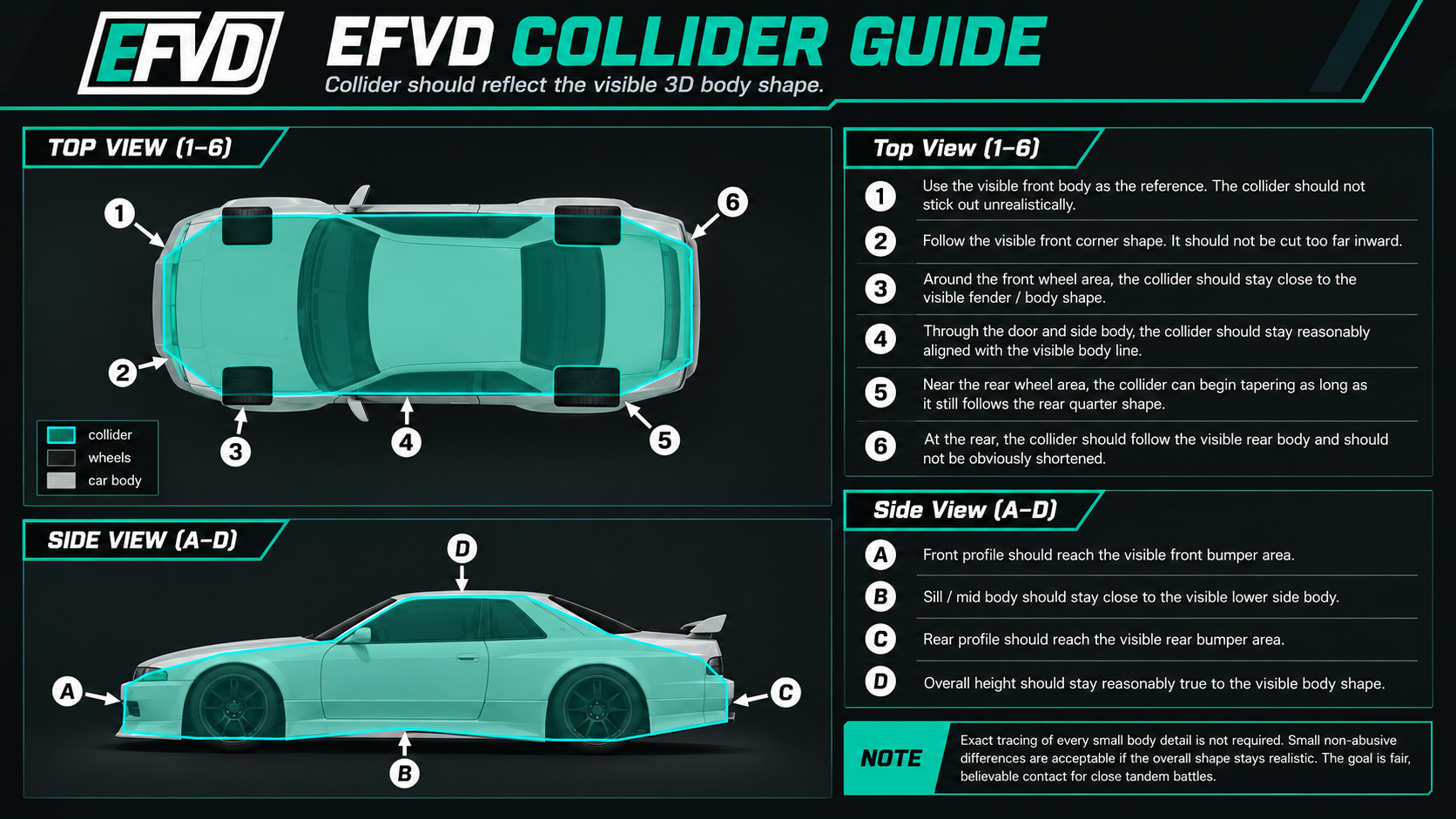
| Colliders | The collider must reasonably represent the car's overall shape and proportions. A clean, simplified shape, modest inset from visible bodywork and tapered corners are permitted to avoid premature contact. Tires, lights and bodywork serve as visual reference points; exact tracing of every detail is not required. Excessive narrowing, shortening, enlargement or offset that creates an unfair contact advantage is prohibited. Final acceptance is subject to technical inspection. |
| Parts placement | Suspension parts, exhaust, wings, bumpers and visible add-on parts must be placed realistically and match the car model. |
| Aero level | No GT-style or higher aerodynamics. |
| Bumper-mounted wings | Bumper-mounted wings must be hit-able. |
| Contact review | Unrealistic collision behavior can cause tech rejection or post-event review. |
TR-09
Folder Structure and Naming
Clean structure helps staff review cars quickly and reduces event-week problems.
| Item | Requirement |
|---|---|
| Folder and KN5 naming | Use EFVD_lastname_model for the car folder and EFVD_lastname_model.kn5 for the main KN5. |
| Archive contents | Submit one car folder only, with no unrelated packages, backups or duplicate copies of the car. |
| Content Manager UI name | The car name shown in Content Manager must visibly include EFVD. |
| SFX folder | Clean SFX folder required. Oversized .bank files may be rejected and staff may request cleanup. |
| Extension folder | The extension folder must only contain files required for the submitted car. Remove unused configs, old test files, backup files, unrelated scripts and assets not used by the approved car. |
| Extension content | CSP extension config may only enhance the existing model: lights, emissives, materials, animations, and displays on existing meshes. It must not add new 3D models or geometry. Car Lua scripts need EFVD approval. Anything that changes the visible shape must be in the main KN5 and match the collider. |
| UI description | UI description must be up to date. |
| Showroom and in-game functionality | The model must open cleanly in Showroom. The car must load and function correctly in the EFVD competition environment, including multiplayer and replay playback. |
| KN5 encryption | Unencrypted KN5 model files are required. Encrypted KN5s cannot be inspected or approved. Protected KN5s (scrambled shape, placeholder textures) count as encrypted. EFVD encrypts the approved car before it is shared for the competition. |
TR-10
Submission, Encryption and Tech Review
Send an inspection-ready car with unencrypted KN5s. EFVD encrypts the approved car before it is shared for the competition.
-
01
Prepare the car
Check names, physics and required assets. Test the car in Content Manager.
-
02
Submit as requested
Send your current car archive through My EFVD when your event entry is ready.
-
03
Submit unencrypted KN5s
Unencrypted KN5 model files are mandatory. Encrypted files cannot be inspected or approved.
-
04
EFVD encrypts the approved car
Your inspector encrypts it before it is shared for the competition.
Event cars are private. Uploading, repacking or sharing cars you do not own, including cars you receive by taking part in EFVD, is prohibited and can lead to a ban.
EFVD takes preventive measures to protect competition car files, but cannot guarantee that leaks will not occur. EFVD cannot be held responsible for unauthorized leaks or distribution of those files.
Cars, numbers, liveries, required decals and required event assets must be approved before the posted technical deadline. Late, changed or incomplete packages may be refused for that event. Car and livery change windows are announced on Discord if applicable.
TR-11
Car Inspection and Corrections
Submit your car link through My EFVD for an inspector to review.
Licensed Drivers and Wild Cards each receive one free official inspection per event. Both follow the same submission, correction and resubmission-fee process if the car does not pass.
Ask an Inspector
Use Ask Inspector for car questions or early feedback. It opens a private question form.
-
01
Registration confirmation
Final Tech submission opens after Event Ops confirms the driver's event registration.
-
02
Car inspection
One official inspection is included per event. The inspector reviews the exact submitted version. My EFVD shows your applicable payment or existing pass coverage.
-
03
Inspection decision
The inspector approves the submitted version, requests changes or rejects the car. The decision explains what to fix, or why the car cannot be used, and the next step.
-
04
Revision, if required
After Changes Requested, the inspector states whether the $5 CAD resubmission fee is required or waived. A rejected car cannot be corrected: enter a different car, whose inspection is included in your entry. Paid resubmission fees are non-refundable by default, including before inspection work starts; exceptions require Event Ops approval. Follow the request in My EFVD before paying.
Help is optional. See the Financial Guide for fees and the Refund & Withdrawal Guide for inspection and revision terms.
TR-12
Approval, Car Updates and Post-Approval Review
Only the exact car version approved through Final Tech may be used in EFVD competition.
| Outcome | Meaning |
|---|---|
| Approved | The car can be used for the event if no later issue is found. |
| Changes Requested | The driver must fix the listed issues before approval. |
| Rejected | The car cannot be used or corrected. Enter a different car for inspection before the car deadline. |
| Post-Approval Review | Staff may check an approved car before, during or after competition. |
Get approval before changing the car
A driver who wants to change car files, physics, collider behavior, required assets or approved visuals must follow staff instructions. Approval of the original version does not cover the update. Another review may be required, and change windows are event-specific.
Staff may recheck an approved car
EFVD may initiate a compliance or spot check before, during or after an event. A public complaint is not required, and this review is not an automatic stage for every driver.
Results can be affected
Illegal or changed files discovered after competition may lead to correction requests, result review, prize ineligibility, event removal or license review. Results and payouts can remain provisional until required checks are complete.
TR-13
Policy Changes
EFVD announces material changes through its official Discord before the affected registration opens.